I Gave Claude Code a Dashboard
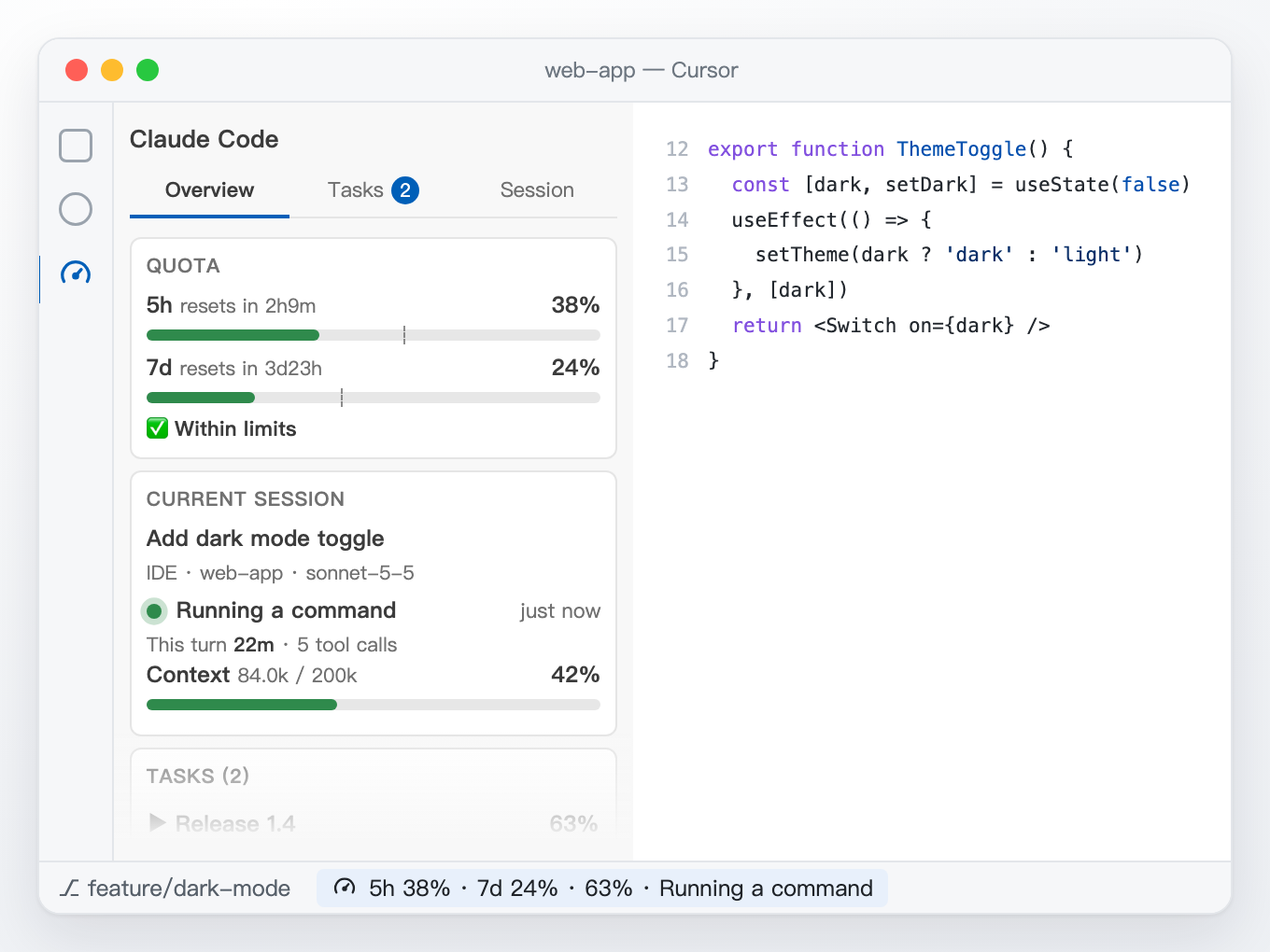
Three things go wrong when you code with Claude Code: the quota runs out without warning, you can't tell how far a task has got, and the context quietly fills up. I built a free, open-source VS Code / Cursor extension that puts all of it in the sidebar and status bar.
If you write code with Claude Code, you have probably had one of these moments:
- Halfway through a task, you hit the usage limit and have to wait hours.
- You ask for a big change, grab a coffee, and come back with no idea how far it got.
- The answers slowly get worse, and only later do you realise the context was full.
The information was there all along. You just couldn't see it. You either switched to a terminal and typed a command, or you guessed. So I built a small extension called Claude Code Panel. It adds a panel to the sidebar and one line to the status bar, so the things that matter are always in view.
One line tells you where things stand
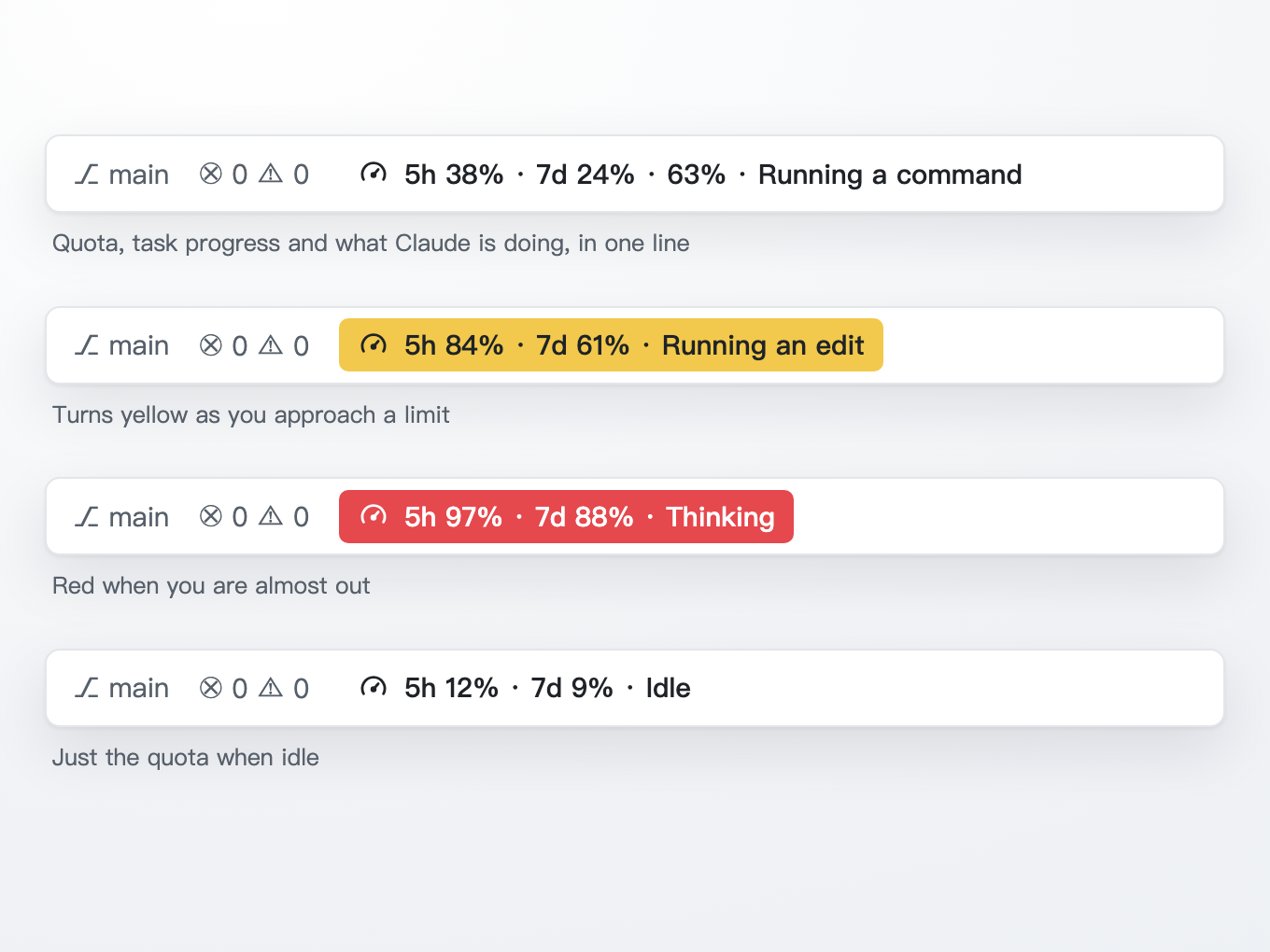
The line in the status bar is what I look at most. From left to right:
- 5h 38%: how much of the 5-hour limit you have used.
- 7d 24%: how much of the weekly limit you have used.
- 63%: how far the current task has got.
- Running a command: what Claude is doing right now, such as thinking, editing a file or running a command.
As you get close to a limit the line turns yellow, and red when you are nearly out. You notice it out of the corner of your eye.
Three tabs, one job each
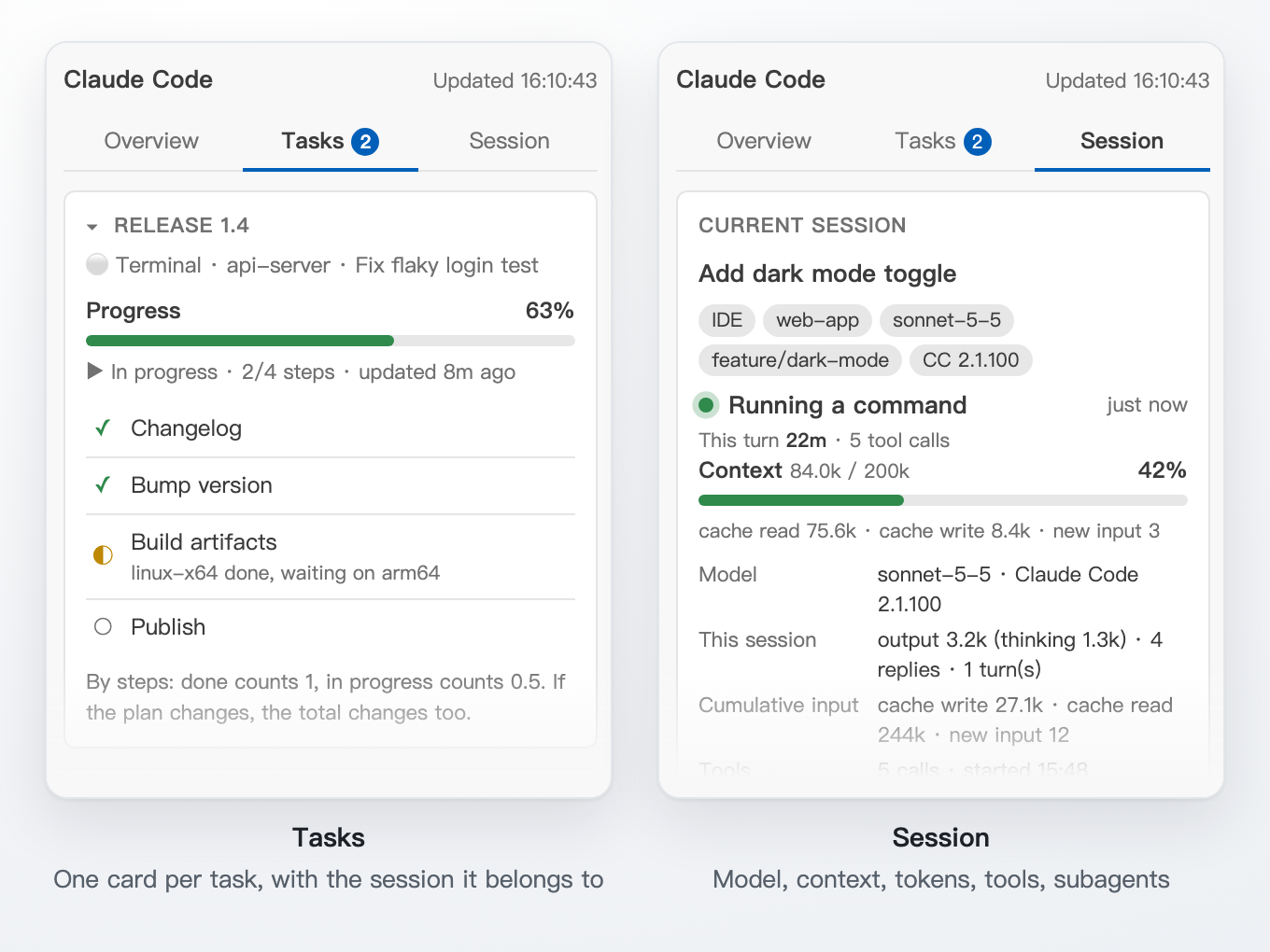
Open the panel and you get three tabs.
Overview: quota, the current session and the tasks in progress. Most of the time this tab is all you need. The thin dashed line on each quota bar is an even-pace marker: where you would be if you used the window evenly. If the green bar is past it, you are burning through it a little fast.
Tasks: one card per task with every step listed, so you can see what is done and what is in progress. Each card says which session it belongs to, so several open windows never get mixed up. The list comes straight from Claude Code's built-in to-do list, with no setup.
Session: which model is in use, how full the context is, how many tokens this conversation has produced, which tools were called, and whether any subagents are still working.
A few design choices I care about
Nothing to install into Claude Code, just local files
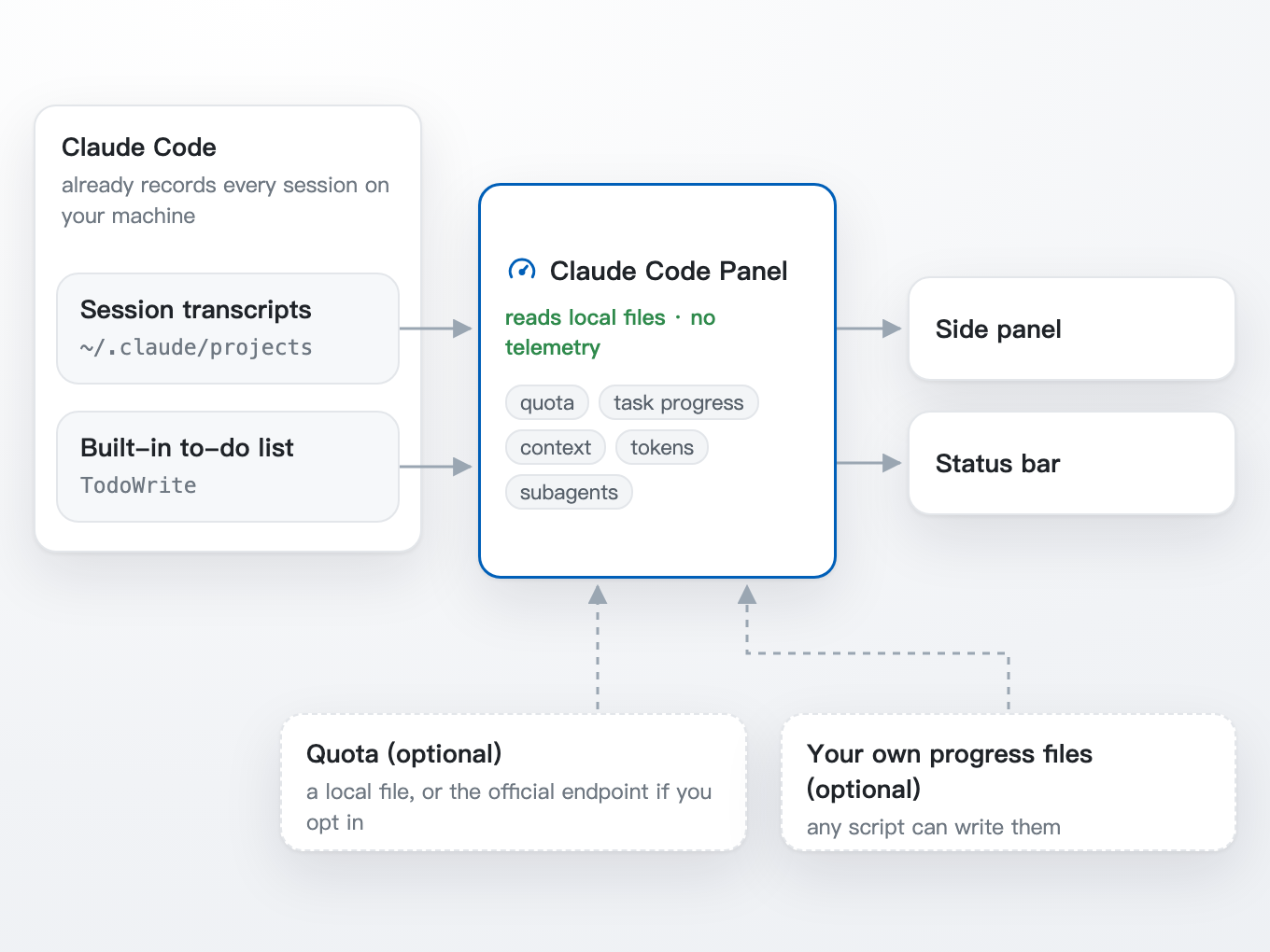
Claude Code already keeps a full record of every conversation in the ~/.claude/projects folder on your computer. The panel simply re-reads those files every few seconds and pulls out what is useful.
So there is nothing to configure and nothing added to Claude Code. No analytics, no telemetry, and your conversations never leave your machine.
It asks before it goes online for quota
Quota is the only thing that may need the network. The first time the panel opens, it asks where the numbers should come from: a local file, or Anthropic's usage endpoint with your permission. If you don't agree, it stays offline.
I insisted on this after getting burned. I had a small script that checked the quota every minute, and over one month it got rate-limited hundreds of times. So even when this extension does go online, it asks only every five minutes by default, and backs off further when it is rate-limited.
Progress says "which step", not "how long"
Task progress uses a plain formula: a finished step counts as 1, a step in progress counts as 0.5, divided by the number of steps.
It tells you how far through the plan Claude is. It does not predict how long the rest will take. If two extra steps turn up halfway, the percentage honestly drops. I would rather have that than a bar that sits at 99% forever.
Works narrow, works wide
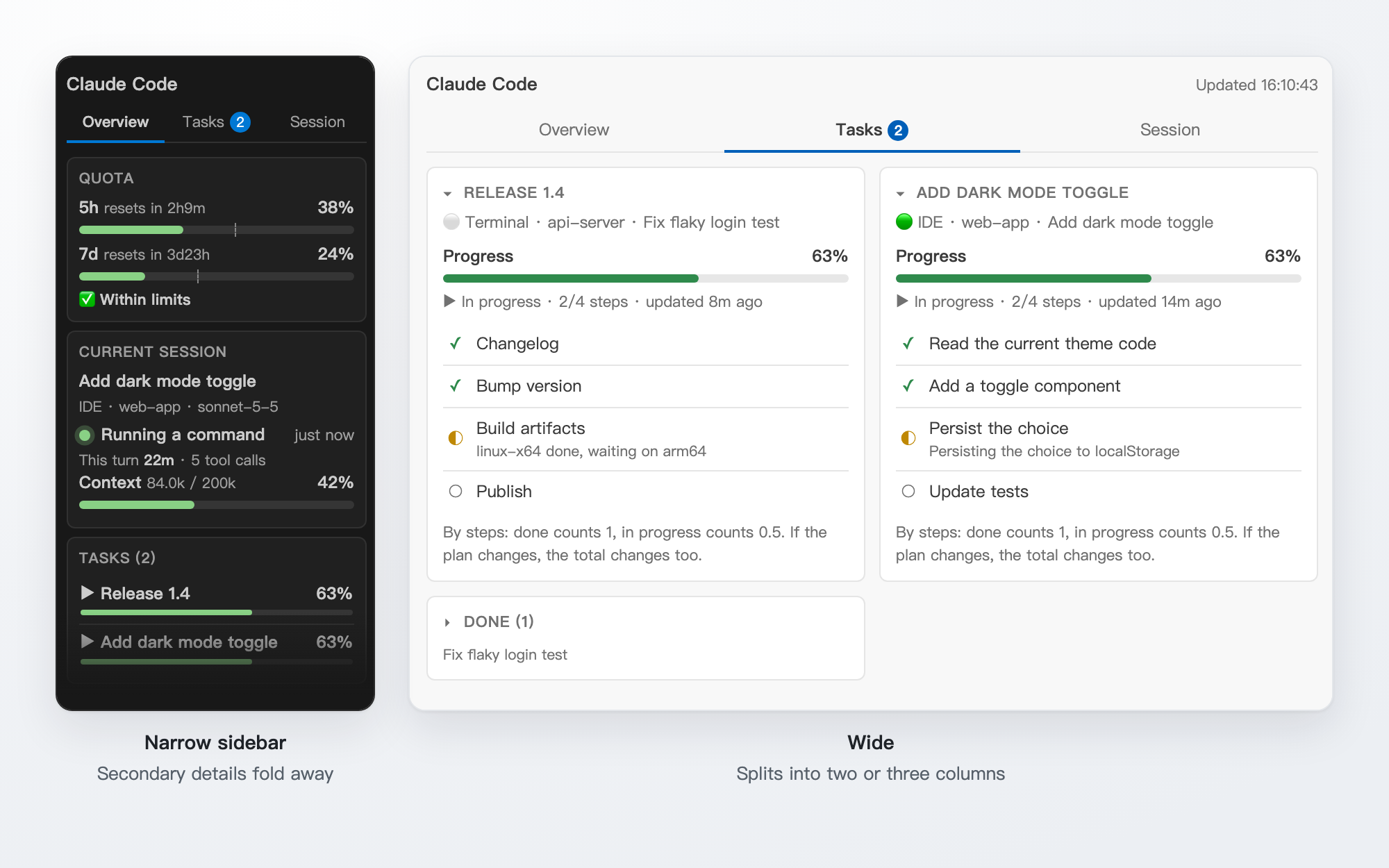
Make the sidebar narrow and the less important details fold away. Make it wide, or drag it into the editor area, and it splits into two or three columns. Light and dark follow your editor theme, and the language follows your editor too, in English or Chinese.
How to install
- Download
claude-code-panel-0.1.0.vsixfrom the release page: github.com/karin-lin/claude-code-panel/releases - Run one of these in a terminal, the first for VS Code and the second for Cursor:
code --install-extension claude-code-panel-0.1.0.vsix
cursor --install-extension claude-code-panel-0.1.0.vsix
- Reload the editor window. A gauge icon appears in the activity bar, and a new line appears in the status bar.
If you prefer not to use the terminal, open the Extensions view, click ... in the top right and choose "Install from VSIX".
Make it your own
A few hooks let you adapt it without touching the code:
- Your own limit line: if you want to stop at 65% of the 5-hour limit, set a line. It is drawn on the bar, with the distance to it.
- Your own quota source: any script that writes a small file in the agreed format can feed the panel.
- Your own task progress: any tool can write a progress file, and the panel attaches it to the right session.
The formats are documented in the project's customizing guide.
Known limits
- It reads Claude Code's local session format, which is not a stable public interface. A future Claude Code update may break parts of it for a while; I will keep it working.
- Some versions of Claude Code don't always write a to-do list. The Tasks tab is empty then, and you can use your own progress files instead.
- "May be waiting for your approval" is a guess: a tool call stuck for over 30 seconds looks the same as a slow command.
- I have tested it most on macOS with Cursor, less on VS Code, Windows and Linux. Please open an issue on GitHub if something breaks.
Finally
This is my first open-source tool. It is MIT licensed and free to use. The source, installer and documentation are on GitHub:
github.com/karin-lin/claude-code-panel
If you code with Claude Code every day, I hope it saves you a few "wait, where did my quota go?" moments.